


Thermotrack PC thermal mapping software for climatic chambers
Map your refrigerators, cold rooms and warehouses according to EN IEC 60068-3-5
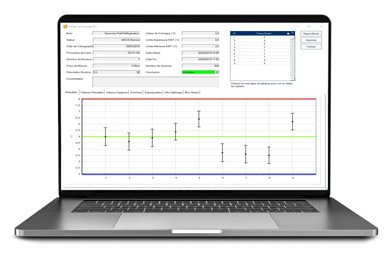
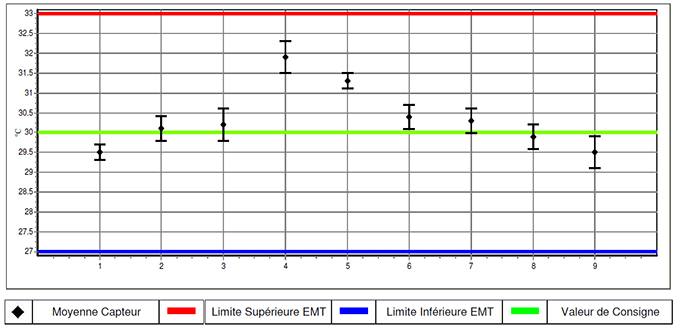
The Thermotrack PC mapping module checks the stability and uniformity of your chambers with Thermo Buttons. It automatically calculates the indicators of the standard and their uncertainties, then generates the mapping report as a PDF with the compliance verdict. Mapping is also possible with Hygro Buttons.


Why map your chambers with Thermotrack PC?
Thermal mapping of a chamber checks that the temperature is stable and uniform at every point of the storage area.
Mapping according to the standard
The indicators calculated follow the EN IEC 60068-3-5 standard: mean temperature, uniformity, stability and setpoint deviation. Your method is recognised during audits.
Automatic calculations
No more spreadsheets: the module calculates means, uniformities, stabilities and deviations as soon as the Thermo Buttons are read, with their uncertainties.
An immediate compliance verdict
You enter the setpoint and the maximum permitted deviations (MPD). The module tells you right away whether the chamber is compliant.
An audit-ready report
Graphs, indicators, calibration links of the sensors and conclusion: the mapping report is generated as a PDF and archived in Thermotrack PC.
Preparing the thermal mapping of a climatic chamber
The mapping module is an option of the Thermotrack PC software. It prepares up to 50 Thermo Buttons at once, the miniature temperature data loggers that you place throughout the chamber.
- Describe the mapping: chamber, author, date, procedure followed, sample rate and resolution.
- Set the acceptance criteria: setpoint value and upper and lower maximum permitted deviations (MPD).
- Identify each sensor: each Thermo Button has an internal number that you note on the chamber plan to identify the zones.
For accurate results, the Thermo Buttons must be calibrated, then adjusted beforehand with the Thermotrack PC calibration module, using their calibration certificate.

Chamber uniformity and stability calculated automatically
At the end of the recording period, read the Thermo Buttons one after another, in any order. The module tells you whether the chamber is compliant and calculates each indicator of the EN IEC 60068-3-5 standard with its uncertainty:
- Mean temperature (air temperature): the mean of the sensor means.
- Environment uniformity: the difference between the highest and the lowest sensor mean.
- Maximum uniformity: the difference between the highest and the lowest value recorded across all sensors.
- Maximum stability: the largest temperature variation observed on a single sensor.
- Setpoint deviation: the difference between the setpoint value and the mean temperature.

A PDF mapping report, generated automatically
The test report gathers everything an auditor or an inspector expects:
- The graph of each temperature data logger and the overlay of all graphs;
- The calibration links of the data loggers and their uncertainties;
- The final compliance verdict for the chamber;
- Your comments.
The report can be printed as a PDF and the data exported to Excel. All mappings are kept in the Thermotrack PC database: you can find the results at any time, to compare two campaigns or to answer an inspection.

How many data loggers are needed to map a chamber?
It depends on the volume of the equipment to be mapped. Typically, 9 data loggers for a refrigerator and 15 for a cold room. For a warehouse, the number depends on its size.
- Less than 0.085 m³: 5 data loggers minimum.
- From 0.085 m³ to 1 m³: 9 data loggers, one at each corner of the working space and one in the centre.
- From 1 m³ to 10 m³: 15 data loggers, the 9 above plus 6 at the centre of the surfaces that delimit the working space.
- More than 10 m³: 15 data loggers minimum, to be determined according to size.
- Chambers with compartments (for example a cabinet with trays or shelves): at least 9 data loggers in total, with a minimum of 2 data loggers per compartment, placed in a staggered pattern.
Our experts are here to advise you on the number and placement of data loggers suited to your chamber.

Mapping of refrigerators, cold rooms and warehouses: who is it for?
For every chamber whose temperature must be shown to be stable and uniform, in healthcare, laboratories and the food industry alike.
Community pharmacies
Qualification of the +2/+8 °C refrigerator with a 9-point mapping, as recommended by the French Order of Pharmacists' guide.
Pharmaceutical distribution
Mapping of 15/25 °C storage areas and cold rooms required by Good Distribution Practice (GDP).
Laboratories and industry
Verification of refrigerators, freezers, incubators and climatic chambers when they are put into service.
Food industry
Checking the uniformity of cold rooms and freezers to keep the cold chain under control.
What you need to map your chambers
The mapping module is added to the Thermotrack PC software and is used with Thermo Buttons, adjusted thanks to the calibration module.
Thermotrack PC Software
Thermotrack PC for Thermo Buttons, Hygro Buttons, iBees combines simplicity of use with a rich variety of information. Everything is done to facilitate your temperature monitoring, program your temperature and humidity data loggers, read them and give you all the keys to checking the cold chain in a single click.
Learn moreCalibration module Thermotrack PC
Learn moreThermo Button
The Thermo Button is the perfect stand-alone data logger for temperature control, HACCP, product tracking and temperature-controlled shipping. Small and sturdy, it fits anywhere. It's splash-proof, shock-proof and dust-proof.
Learn moreFrequently asked questions about thermal mapping of chambers
Standard, indicators, number of sensors and mapping report.
What is thermal mapping of a chamber?
It is a measurement campaign carried out with several data loggers placed throughout the chamber. It checks that the temperature is stable over time and uniform at every point of the storage area.
Which standard does the mapping module follow?
The EN IEC 60068-3-5 standard: Environmental testing - Part 3-5: Supporting documentation and guidance - Confirmation of the performance of temperature chambers. The indicators calculated by the module follow this standard.
How many data loggers are needed for a mapping?
It depends on the volume of the equipment to be mapped. Typically, 9 data loggers for a refrigerator and 15 for a cold room. For a warehouse, the number depends on its size. Our experts can also advise you on this.
How many Thermo Buttons can be used?
Up to 50 Thermo Buttons per mapping. The number depends on the volume of the chamber: a pharmacy refrigerator, for example, is mapped with 9 points.
How long does a mapping last?
It depends on the chamber and on your procedure: generally 24 hours for a refrigerator and one week for a warehouse.
How often should the mapping be done?
At a minimum once when the equipment is put into service, then after every significant change to the equipment (for example, replacing the compressor of a refrigerator or the air-conditioning system of a warehouse). For a pharmaceutical warehouse, one mapping in summer and one in winter are required.
Should the Thermo Buttons be calibrated before a mapping?
It is recommended. Thermo Buttons that are calibrated and then adjusted with the calibration module reduce uncertainties, and their calibration links appear in the report.
Can you carry out the mapping for us?
Yes. Our thermal mapping service sends you the programmed Thermo Buttons, analyses the data and delivers the report. Beyond two chambers, buying a pack with the module becomes more cost-effective.
They use Thermotrack PC
Food industry, healthcare, pharmacy, industry, watchmaking and research.


Thermotrack PC, its modules and accessories
The software for reading your Thermo Buttons, the 21 CFR Part 11 expert module and the accessories to attach your sensors.

A question about the mapping module?
Our team answers you and helps you set up the mapping of your chambers.